AWS IAM Policies
IAM policies are JSON-based documents that specify what actions an identity can perform on which resources and under what conditions. Through IAM policies we explicitly decide the permissions that allowed for a particular IAM user or group or role.
Lets take a look at a sample IAM policy and understand its components:-
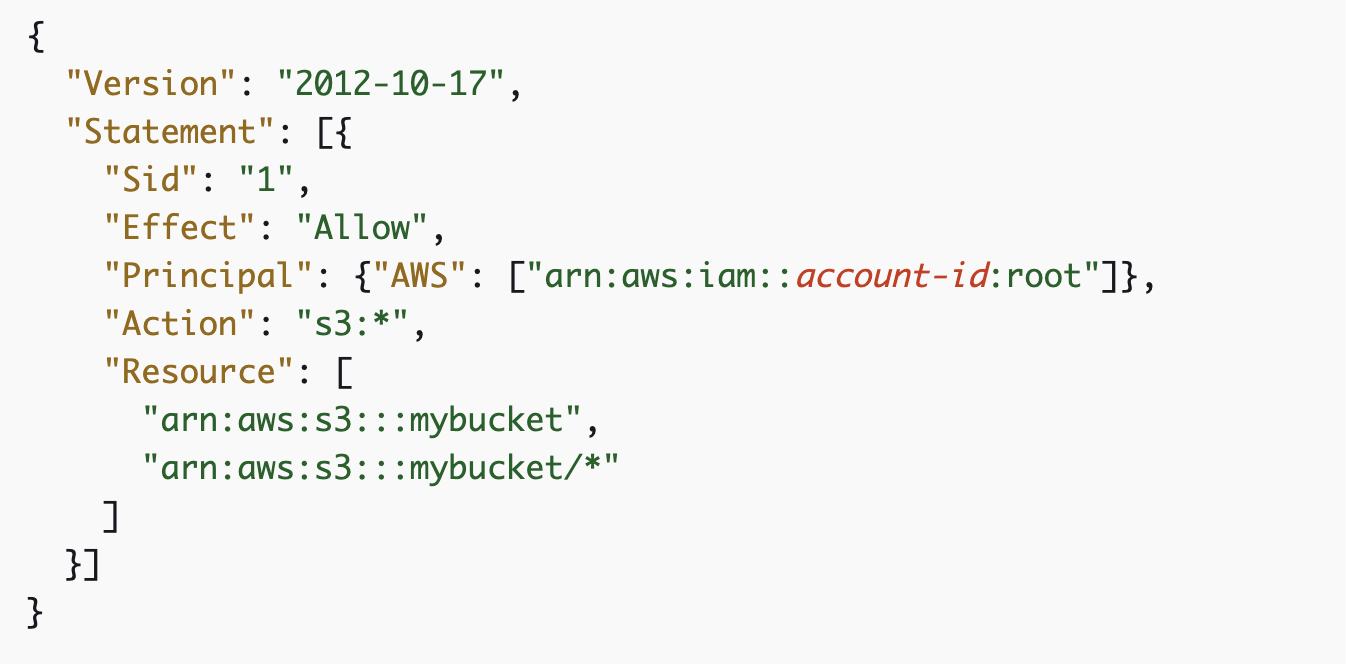
Components of an IAM Policy:
Version: Version specifies the policy language version. It helps to ensure that the policy is interpreted correctly according to the syntax and features available at that version.
Statement: Statement outlines a single permission rule ,detailing the effect(allow or deny), actions, resources, and optional conditions. Multiple statements can be included in a policy, collectively defining the permissions of the principal.Each statement is formatted as a JSON object within the policy document.
Sid: Statement ID(Sid) is an optional identifier for a statement. It helps uniquely name and reference specific statements, making the policy easier to manage and debug.
Effect: Effect specifies whether the policy allows or denies the actios. The effect can be "Allow" or "Deny".
Principal: Principal is the entity that is allowed or denied access to a resource.This could be a user, group or service.
Action: Action indicates the operations that are allowed or denied. In the above example it shows all the operations related to s3 are allowed.
Resources: Resources are the specific objects or entities that actions can be performed on. This can be a database, a server or any other service.
Conditions: Conditions are optional specifications that can be used to further refine when a policy is in affect.It can be constraints based on IP address, requester's locations etc.
Types of IAM policies:-
Managed Policies: These are predefined policies that are created and managed by AWS. They are readily available and can be attached to multiple users,groups or roles.
Customer Managed Policies: These are custom policies created and managed by the user.It allows more granular control over permissions.
Inline Policies: Policies which are embedded directly within a user, group or role and provides specific permissions that are unique to that principal.
Service Control Policies (SCPs): These are policies that are used inAWS organizations to manage permissions across accounts, defining what actions users and roles in the organizations can perform.
Permission Boundaries: These are permissions that define the maximum permissions a user or role can have, acting as an upper limit on permissions.
Access Control Lists(ACLs): ACLs are policies that control access to specific resources such as s3 buckets, by defining who can access them and what actions they can perform.
IAM policies are very crucial for :
Granular Control: IAM policy provide fine-tuned permissions , allowing precise management of who can do what within a cloud environment.
Security: IAM policy control access to resources, ensuring only authorized users can perform specific actions.
Compliance: IAM policies helps to meet regulatory and organizational requirements by enforcing access controls.
Centralized Management: IAM policies simplifies the administration of user permissions in larger environments.
To summarize, understanding IAM policies and their uses is crucial for maintaining AWS accounts. What an IAM identity can do in an account entirely depends on the IAM policies attached to that user. To read more about IAM policies click here.